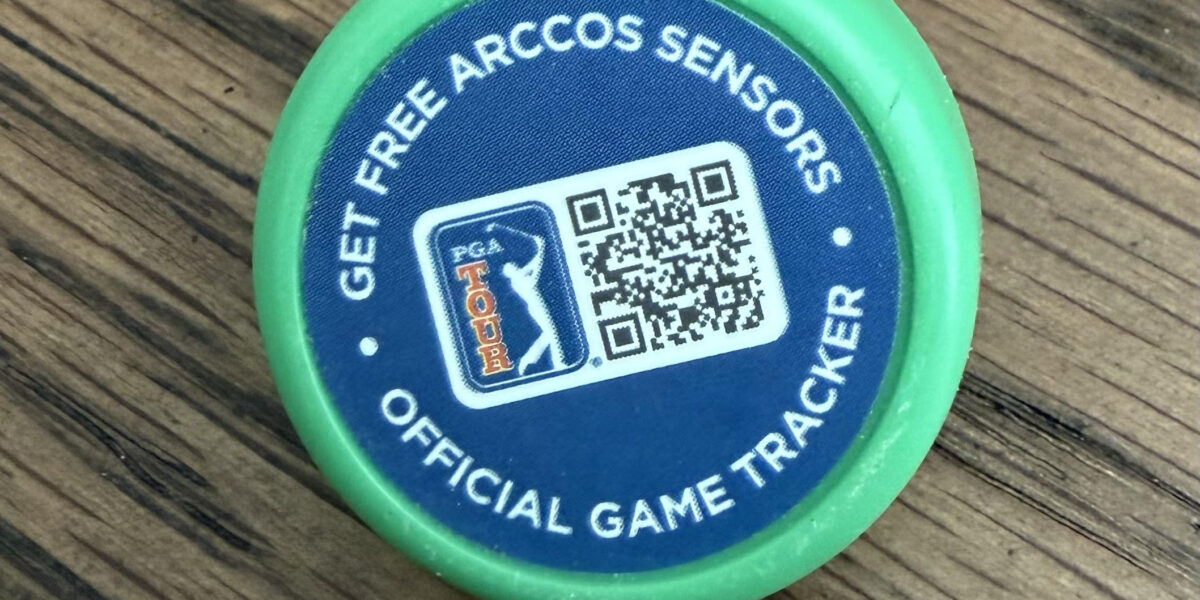
So you just bought new clubs from Ping, Cobra, TaylorMade, or Cleveland/Srixon — and you noticed small green sensors screwed into the butt end of each grip. Maybe the pro shop mentioned something about “shot tracking.” Maybe you have no idea what they are.
Those are Arccos Smart Sensors, and they might be the most valuable free bonus you’ve ever gotten with a club purchase. Here’s everything you need to know — what they do, how to activate them, what’s free, and whether the subscription is worth your money.
What Are the Green Sensors on My New Golf Clubs?
The green sensors are Arccos Smart Sensors — small, lightweight shot-tracking devices that screw into the hole at the top of your club grip. Each sensor weighs about 7 grams (roughly the weight of two tees) and sits flush enough that you won’t notice them during your swing.
Arccos has partnerships with several major club manufacturers to include these sensors as a free add-on when you buy new clubs. Currently, the brands offering Arccos sensors with new club purchases include:
- Ping — Available as a custom option on all Ping clubs (sensors or Smart Grips)
- Cobra — Cobra Connect powered by Arccos, included since 2016
- TaylorMade — Free sensor program with new club purchases
- Cleveland / Srixon — Free trial program with new clubs
The green sensors are for your regular clubs. You’ll also find (or receive) one all-black sensor — that’s specifically designed for your putter.
The green sensors are free shot trackers. They pair with the Arccos Caddie app on your phone to automatically track every shot you hit — distance, location, club used — and give you detailed stats about your game. You get a free trial (typically 45 days) included with your new clubs.
How Do Arccos Sensors Work?
The system is straightforward once you understand the pieces:
- Sensors detect impact — When you hit a golf ball, the sensor in that club detects the vibration and sends a Bluetooth signal to your phone
- Your phone tracks location — The Arccos Caddie app uses your phone’s GPS to record exactly where that shot happened on the course
- The app does the math — When you hit your next shot with a different club, the app calculates the distance of your previous shot and maps it on the hole
- After the round — You get a complete shot-by-shot map of your round plus stats on every club in your bag
The key requirement: your phone must be on your person during the round — either in your front pocket or on a belt clip. If you leave your phone in the cart, the GPS readings will come from wherever the cart is, not where you’re standing. This is the most common mistake new users make.
How Do I Set Up the Arccos Sensors That Came with My Clubs?
Setup takes about 10-15 minutes. Here’s the process:
Step 1: Download the app. Get the Arccos Caddie app from the App Store (iPhone 8 or newer, iOS 16+) or Google Play Store (select Android devices with gyroscope and accelerometer, Android 11+).
Step 2: Create an account. Sign up for free. If your clubs came from a partner brand (Ping, Cobra, TaylorMade, etc.), you’ll typically get a 45-day free trial of the full Arccos Caddie system.
Step 3: Install sensors on any remaining clubs. If you only bought irons, you’ll need sensors on your woods, wedges, and putter too — Arccos works best with sensors on every club. Many OEM programs include a full set of 14 sensors (13 green + 1 black putter) even if you only purchased a partial set of clubs.
Step 4: Pair each sensor. Pull one club out of your bag at a time, hold the sensor under your phone’s camera, and the app will scan and pair it. Assign each sensor to the correct club. The app walks you through this step by step.
Step 5: Play golf. Put your phone in your front pocket (left pocket for right-handed golfers, right pocket for lefties), start a round in the app, and swing away. The sensors do the rest.
Make sure all clubs are returned to your bag before you start pairing. Sensors deactivate when the club is upside down in your bag, and you want to pair them one at a time to avoid cross-pairing mistakes.
What Do I Get for Free vs. What Requires a Subscription?
This is the question everyone asks — and the answer matters because the free trial is genuinely useful, but the real power of Arccos requires the paid subscription.
| Feature | Free Trial (45 days) | Paid Subscription |
|---|---|---|
| Shot tracking | Yes | Yes |
| Shot-by-shot round map | Yes | Yes |
| Basic stats (FIR, GIR, putts) | Yes | Yes |
| AI Caddie (club recommendations) | Yes (during trial) | Yes |
| Smart Club Distances | Yes (during trial) | Yes |
| GPS Rangefinder | Yes (during trial) | Yes |
| Strokes Gained analysis | Yes (during trial) | Yes |
| Green Maps | Yes (during trial) | Yes |
| Start new rounds after trial | No | Yes |
| Ongoing data collection | No | Yes |
The catch: After your 45-day free trial ends, you cannot start new rounds or collect new data without an active membership. The annual subscription is $155.88/year ($12.99/month billed annually). Without it, the sensors become paperweights.
This is important to understand before you get hooked on the data. Arccos gives you a taste of the full system during the trial — and it’s a compelling taste — but the ongoing value requires the subscription.
Is the Arccos Subscription Worth It?
As someone who’s tracked 18,000+ shots over 40+ rounds with Arccos — yes, but with caveats.
It’s worth it if:
- You play 20+ rounds per year — the data needs volume to be meaningful
- You’re a mid-handicapper (10-20) actively trying to improve
- You’re willing to spend 3-5 minutes per round on post-round data cleanup
- You want to know where you’re actually losing strokes (not where you think you are)
It’s probably not worth it if:
- You play fewer than 10 rounds a year
- You just want basic GPS yardages (a $200 Garmin watch does that without a subscription)
- You don’t like carrying your phone on the course
- You’re not interested in data-driven improvement
My honest take: Use the full 45-day free trial that came with your clubs. Play at least 5-6 rounds with it. If the data surprises you (and it will) — the subscription pays for itself in strokes saved. If you find yourself ignoring the app after a few rounds, save your money.
For my complete deep dive on whether Arccos is worth the investment after a full season of data, read my Arccos Caddie Smart Sensors Review.
Do I Need Sensors on Every Club?
Yes. Arccos is designed as a full-bag system. The AI Caddie, strokes gained analysis, and smart distances all depend on having sensors on every club — including your putter. If you only have sensors on the irons that came with your new clubs, you’ll get incomplete data.
The good news: most OEM programs (Ping, Cobra, TaylorMade) send you a full set of 14 sensors even if you only bought a partial set of clubs. If you only received sensors for the clubs you purchased, you can buy additional sensors from Arccos directly — individual sensors and bundles are available on their website.
Active annual members also get 5 free replacement sensors per year through Arccos’s sensor renewal program — useful for replacing dead sensors or covering new clubs you add to the bag.
Will the Sensors Affect My Swing or Club Feel?
No. At roughly 7 grams per sensor, the weight is negligible — about the same as two tees. The sensors sit inside the grip cap area and don’t change the swing weight, balance, or feel of the club in any perceptible way. After my first few swings, I completely forgot they were there.
The sensors also don’t add meaningful length to the club. They sit within the existing grip cap depth, so your grip position doesn’t change.
How Long Do the Sensors Last?
Arccos sensors have a built-in battery that’s rated for at least 2 years of use, with an expected life of up to 5 years based on 50 rounds per year. The batteries are not user-replaceable — when a sensor dies, you replace the entire sensor.
If you’re an annual member, the 5 free sensors per year program helps offset replacement costs over time.
What If I Only Have a Few Clubs with Sensors?
If you bought just a set of irons and they came with sensors, you have a few options to get full-bag coverage:
- Sign up for a free trial through Arccos directly — this often includes a full set of 14 sensors (you just pay shipping). Visit arccosgolf.com and look for free trial programs from your club manufacturer.
- Buy a full sensor set — Arccos Smart Sensors are available for around $180 and include a first-year membership
- Buy individual replacement sensors — Available on the Arccos website in bundles of 3 or 5, with member discounts
Get the full Arccos Caddie Smart Sensors set
14 sensors + first year of Arccos Caddie membership included. The best shot tracking system for golfers who want real data about their game.
Check Price on AmazonFrequently Asked Questions
What are the green sensors on my new golf clubs?
They are Arccos Smart Sensors — small shot-tracking devices included free with new clubs from Ping, Cobra, TaylorMade, and Cleveland/Srixon. They pair with the Arccos Caddie app on your phone to automatically track every shot, measure distances, and provide AI-powered club recommendations and strokes gained analysis.
Are the Arccos sensors that come with new clubs free?
The sensors themselves are free with qualifying club purchases. You also get a free trial of the Arccos Caddie app (typically 45 days). After the trial, you need a paid annual subscription ($155.88/year or $12.99/month) to continue tracking new rounds and accessing the AI Caddie features.
Do I need Arccos sensors on every club in my bag?
Yes. Arccos is designed as a full-bag system and works best with sensors on all 14 clubs including your putter. Most OEM programs include a full set of sensors even if you only bought a partial set of clubs. If you need additional sensors, you can purchase them directly from Arccos.
How do I activate the Arccos sensors on my new clubs?
Download the Arccos Caddie app, create an account, screw the sensors into each club grip, then pair each sensor one at a time using your phone’s camera. The app walks you through the entire process. Setup takes about 10-15 minutes.
Do I need my phone on me for Arccos to work?
Yes. Your phone must be in your front pocket or on a belt clip during the round. Arccos uses your phone’s GPS to record where each shot occurs. Leaving your phone in the cart will result in inaccurate location data. Alternatively, you can use an Apple Watch (Series 6+) or the Arccos Link Pro device for a phone-free on-course experience.
Will the Arccos sensors change how my clubs feel?
No. Each sensor weighs approximately 7 grams (about two tees) and sits within the existing grip cap area. They don’t change swing weight, balance, or grip feel. Most golfers forget the sensors are there after a few swings.
What happens when the Arccos sensors die?
Arccos sensors have a built-in battery rated for 2-5 years of use. When a sensor’s battery dies, you replace the entire sensor — the battery is not user-replaceable. Annual members receive 5 free replacement sensors per year through Arccos’s renewal program.
Which club brands include Arccos sensors with new clubs?
Currently Ping, Cobra, TaylorMade, and Cleveland/Srixon offer Arccos sensors as a free add-on with new club purchases. The availability and trial length may vary by brand and retailer, so ask your pro shop or check the manufacturer’s website for current offers.
Disclosure: This post contains affiliate links. If you purchase through these links, GolfEdge.ai may earn a commission at no additional cost to you. All opinions are my own, based on 40+ rounds of personal testing with Arccos sensors.